 Git History
Scroll through git log in a terminal
Read every line's history beside your code
Git History is a free VS Code extension. Select a few lines, right-click a file or folder, or press Ctrl+Alt+H. You see each commit that changed it, its diff in an editor tab, and the files it touched.
code --install-extension vitalivu992.git-history-vsce
Works in VS Code 1.85+ and in editors that install from Open VSX (VSCodium, Cursor, Windsurf, Gitpod). MIT licensed.
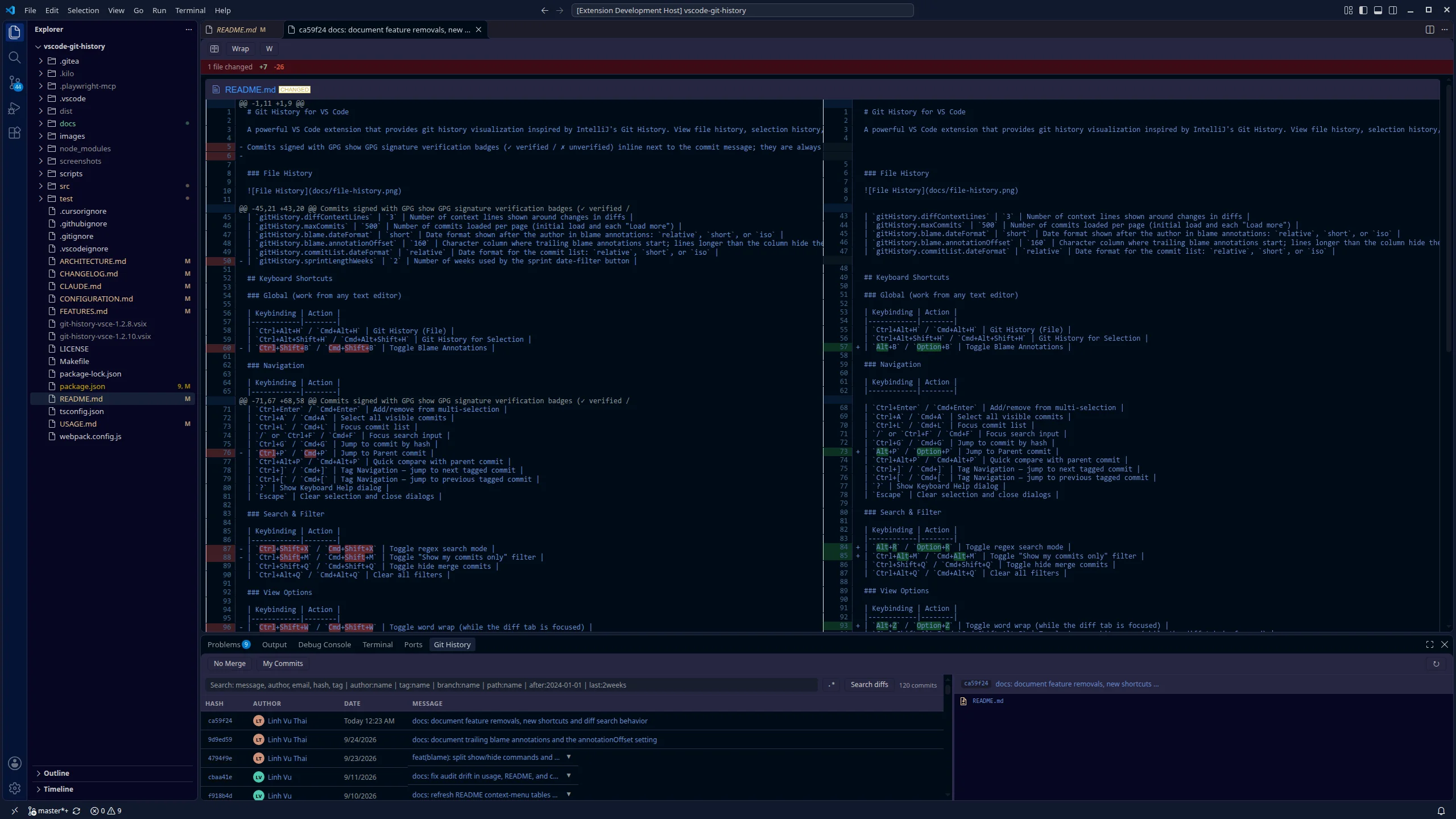
Four ways to open history
Start from the thing you are looking at. The panel shows only the commits that changed it.
-
A file
Every commit that changed the open file, renames included.
Right-click in the editor → Git History (File), or Ctrl+Alt+H -
A few lines
Only the commits that touched the selected lines, using
git log -L.Select lines → right-click → Git History for Selection, or Ctrl+Alt+Shift+H -
A file or folder in the Explorer
Commits under that path. Diffs and changed files show only that path, in folder-tree order.
Right-click in the Explorer → Git History -
The whole repository
The full branch log, loaded 500 commits at a time with a Load more row.
Command Palette → Git History (Repository)
Selection history follows the lines, not the file
Select a block of code and ask who changed it. Commits that edited other parts of the file stay out of the list, so a 5-year-old file with 400 commits can come down to the six that matter.
The changed-files list and the diff are scoped to the tracked file, so the answer stays focused.
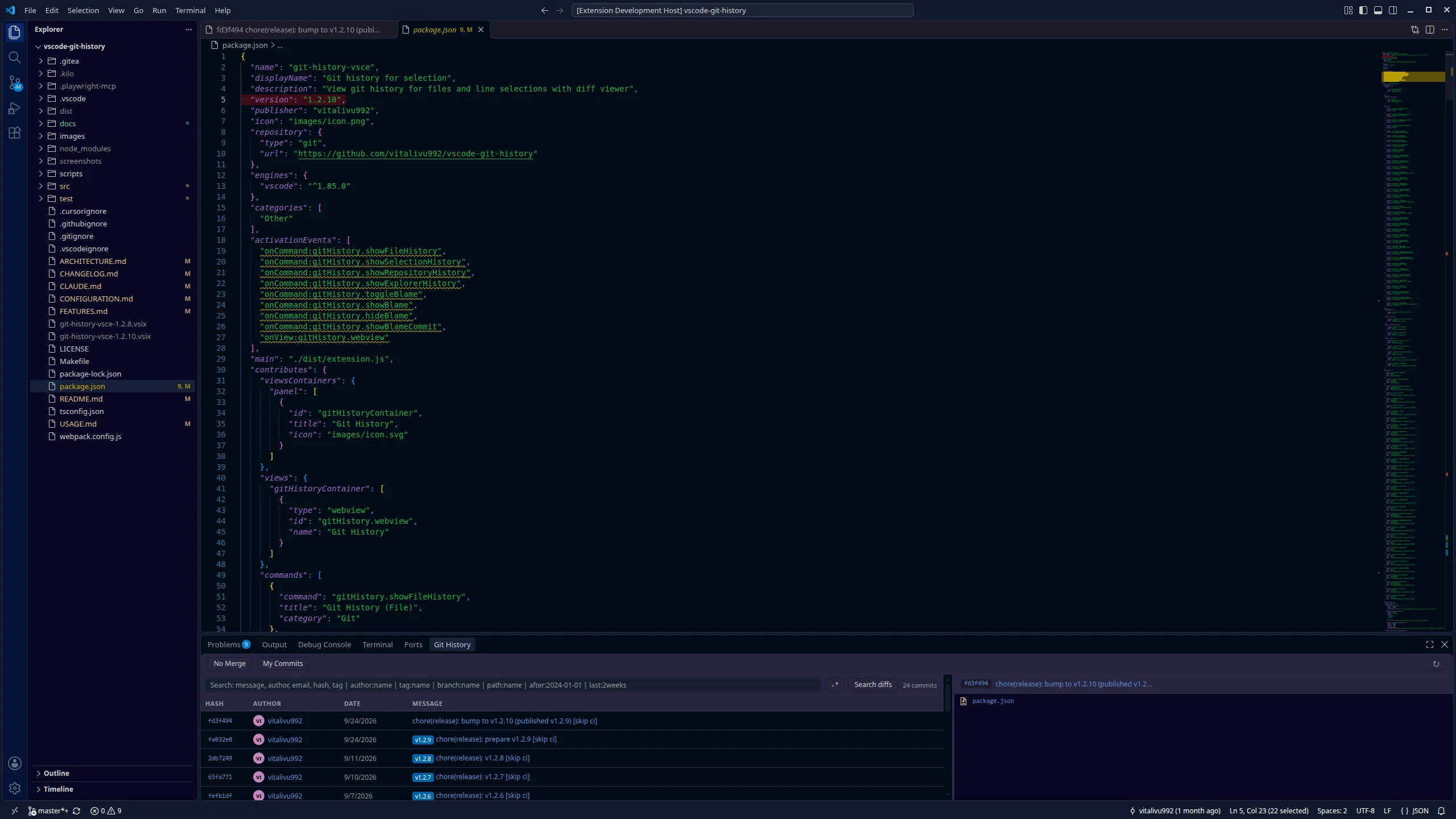
"version" line of package.json is selected. The panel lists only the release commits that changed it, with their tag badges.The list stays put, the diff gets the room
- Diff in an editor tab. One reusable tab, titled with the short hash and subject. It opens without taking focus from the list, so arrow keys keep moving through commits.
- Changed files beside the list. GitHub-style status icons for added, modified, deleted, renamed and copied files. Click a file to scroll the diff to it.
- Large repositories. Commits load in pages (
gitHistory.maxCommits, 500 by default). - Readable rows. Author avatars, tag badges, relative dates with the exact time on hover, and expandable commit bodies.
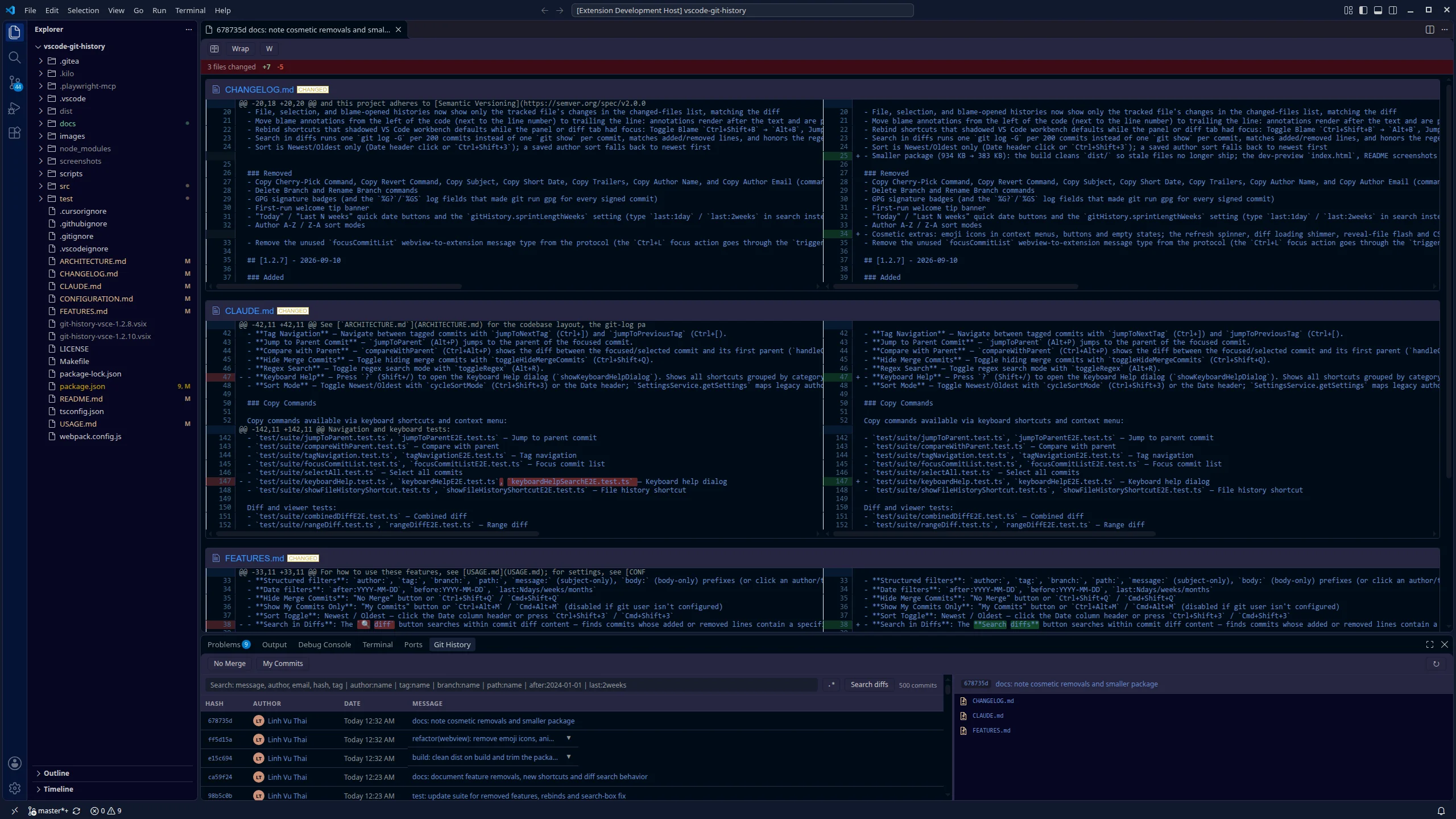
A diff viewer that fits the tab
The diff tab picks its own layout. It opens side by side when each side can show at least 120 characters per line, and unified when it cannot. Resize the tab and it decides again, until you click the toggle yourself.
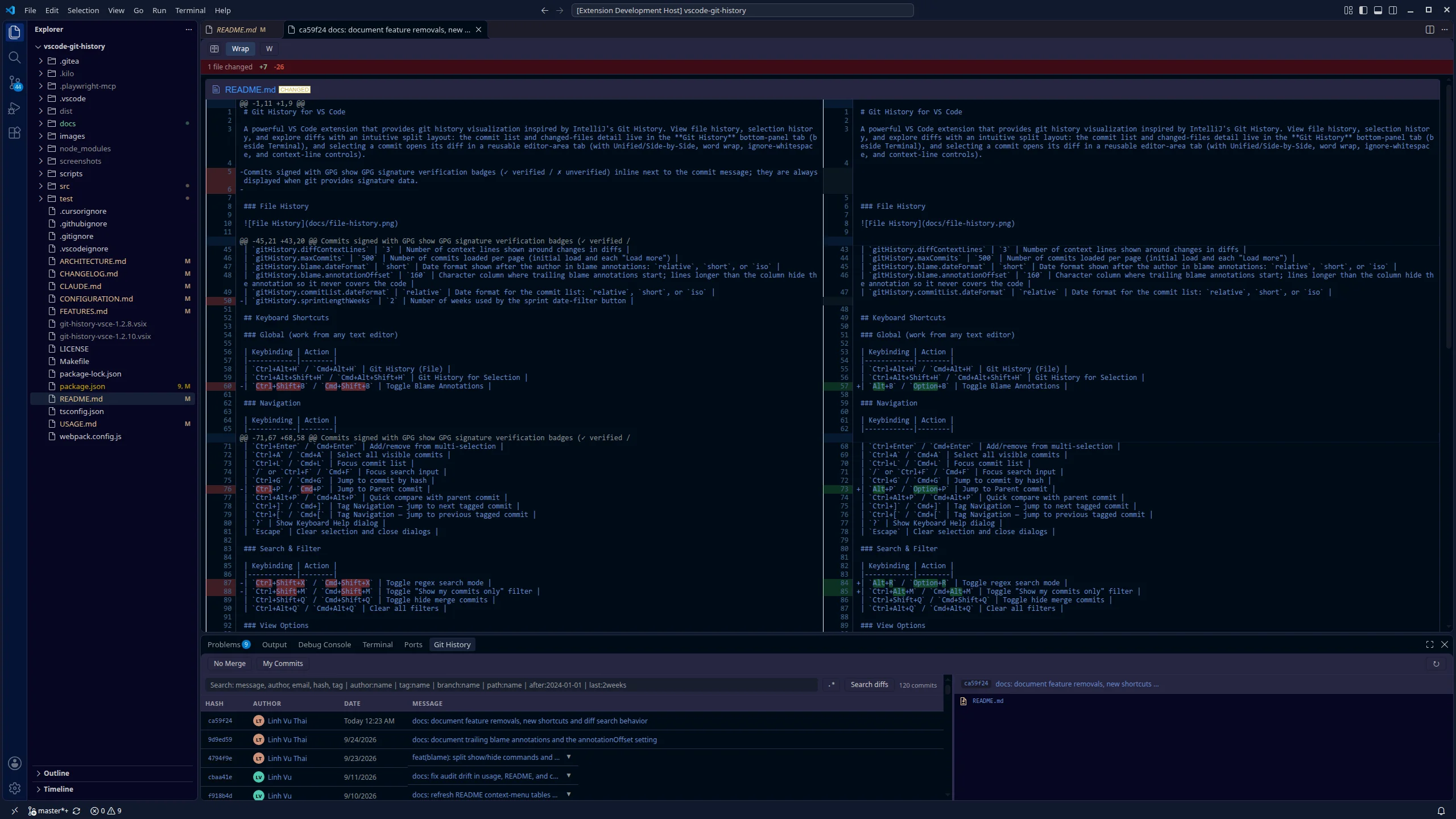
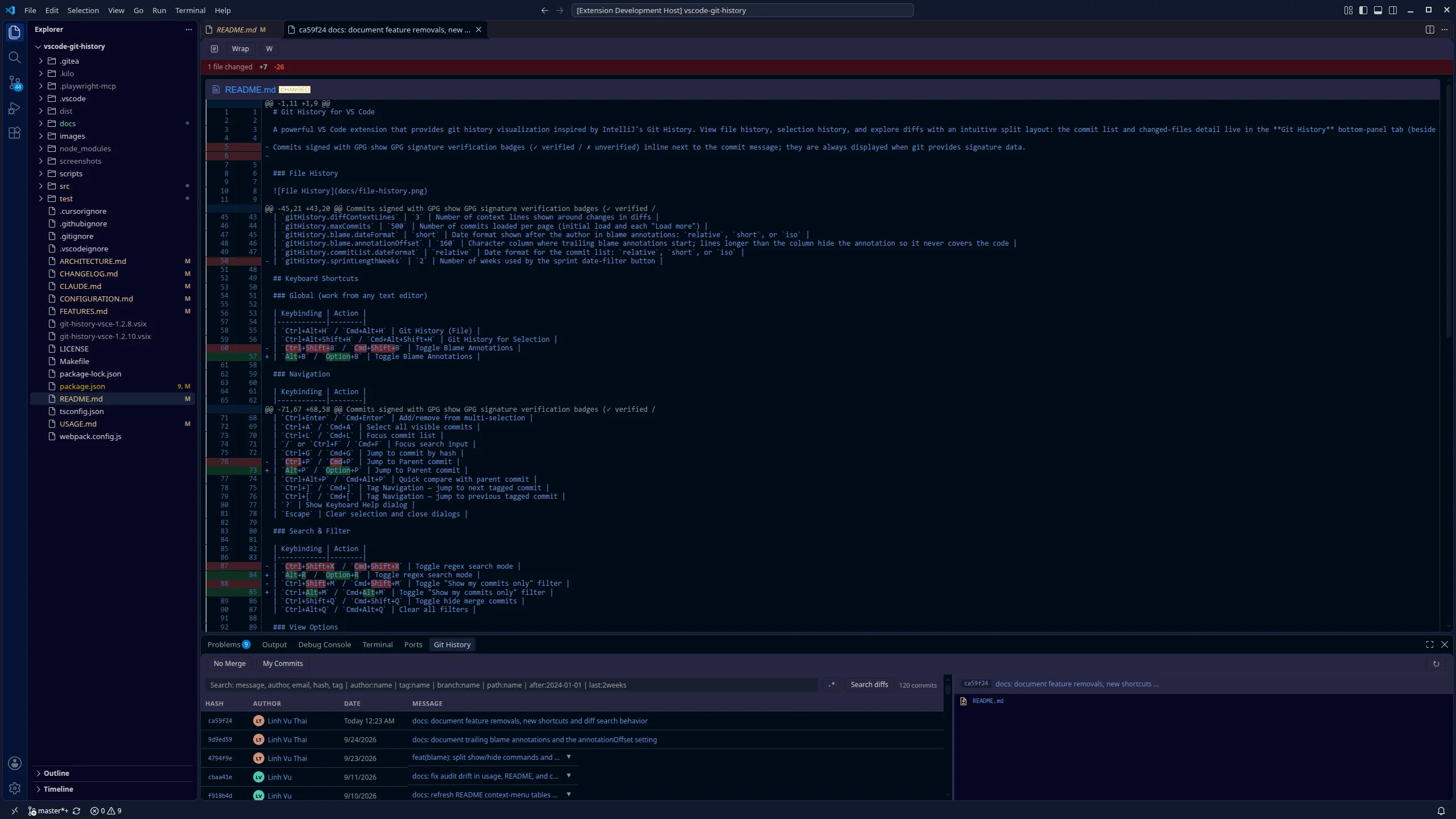
gitHistory.defaultDiffView to unified.- Compare any two commits. Shift+click two rows (or Shift+Enter) for the diff between them, for example
v1.0againstv2.0. - Combine commits. Ctrl+click rows that are not next to each other to see their changes as one diff.
- Compare with parent. Ctrl+Alt+P shows the focused commit against its first parent.
- Ignore whitespace. The W button or Ctrl+Shift+Alt+J re-runs the diff with git's
-w. - Stats bar. N files changed, +insertions, -deletions above every diff.
- Folder-tree order. Diff sections follow the Explorer: sub-folders before files, natural number order.
Search that knows what a commit is
Type plain words to match the message, author, email, hash or tag. Add prefixes to narrow it down, and mix them freely. Try it below on a sample repository.
| Hash | Author | Date | Message | Files |
|---|
This demo runs in your browser on made-up data. In the extension the same query filters your real history as you type.
| Prefix | Matches | Example |
|---|---|---|
author: | Author name or email. Click an author in the list to add it. | author:alice@example.com |
tag: | Tag names, partial match. Click a tag badge to add it. | tag:release |
branch: | Commits reachable from a branch. | branch:feature/login |
path: | Commits that changed a file or folder. | path:src/ |
message: | Subject line only. | message:auth |
body: | Commit body only. | body:oauth2 |
after: before: | Commit date, YYYY-MM-DD. | after:2026-01-01 |
last: | Recent days, weeks or months. | last:2weeks |
| Alt+R | Regex mode. An invalid pattern turns the button red and shows the error in its tooltip. | bug(fix|patch)|hotfix |
Search inside the diffs
The Search diffs button answers "when did this code appear, or disappear?". It finds commits whose added or removed lines contain your text, using git log -G in batches of 200 commits, and it follows the regex toggle.
- My Commits (Ctrl+Alt+M) shows only your commits, from
git config user.nameanduser.email. - No Merge (Ctrl+Shift+Q) hides merge commits.
- Newest or oldest first: click the Date header or press Ctrl+Shift+3.
- Clear all filters with Ctrl+Alt+Q. The count reads "12 of 142 commits" while a filter is on.
Blame that stays out of the code
Press Alt+B in any editor. Each block of lines from the same commit gets the author and date, trailing the code.
- Aligned in one column. Annotations start at column 160 (
gitHistory.blame.annotationOffset). A line longer than that hides its annotation, so the text never sits on top of code. - From blame to the commit. Hover an annotation and click Show commit details, or click the status bar item, to open that commit in the Git History panel.
- Start from the gutter. Right-click a line number for Show / Hide Git Blame Annotations.
- Your date format.
relative,shortorisothroughgitHistory.blame.dateFormat.
Act on a commit without leaving the list
Right-click a commit or a changed file. Commands that change your working tree ask before they run.
On a commit
Switch branch from the branch badge (right-click) or Ctrl+Alt+S: a searchable list of local and remote branches.
On a changed file
Links that work for your whole team
Commit and file links are built from your origin remote, over HTTPS or SSH, including SSH on a custom port.
- GitHub
- GitLab
- Bitbucket
- Azure DevOps
Keyboard shortcuts
Every list action has a key. Press ? in the panel to see them all. Shortcuts that would hide a VS Code default were moved to keys that do not.
| Keys | Action |
|---|---|
| Ctrl+Alt+H | Git History (File) |
| Ctrl+Alt+Shift+H | Git History for Selection (needs a selection) |
| Alt+B | Toggle blame annotations |
| Keys | Action |
|---|---|
| ↑ ↓ | Previous / next commit |
| Home End | First / last commit |
| PageUp PageDown | Up / down 10 commits |
| Enter | Show the focused commit's diff |
| Shift+Enter | Select a range to compare |
| Ctrl+Enter | Add to or remove from the selection |
| Ctrl+A | Select all visible commits |
| Ctrl+L | Focus the commit list |
| / Ctrl+F | Focus search |
| Ctrl+G | Jump to a commit by hash |
| Alt+P | Jump to parent commit |
| Ctrl+] Ctrl+[ | Next / previous tagged commit |
| ? | Keyboard help |
| Escape | Clear selection, close dialogs |
| Keys | Action |
|---|---|
| Alt+Z | Toggle word wrap |
| Ctrl+Shift+Alt+J | Toggle ignore whitespace |
| F5 Ctrl+Shift+R | Refresh list and diff (also in the panel) |
| Keys | Action |
|---|---|
| Alt+R | Regex search |
| Ctrl+Alt+M | My commits only |
| Ctrl+Shift+Q | Hide merge commits |
| Ctrl+Shift+3 | Newest / oldest first |
| Ctrl+Alt+Q | Clear all filters |
| Keys | Action |
|---|---|
| Ctrl+Alt+C | Copy commit hash |
| Ctrl+Shift+7 | Copy short hash |
| Ctrl+Shift+I | Copy commit info |
| Ctrl+Shift+Alt+R | Copy the diff between two commits |
| Ctrl+Shift+L | Copy commit URL |
| Ctrl+Shift+Alt+L | Open commit URL in browser |
| Ctrl+Alt+P | Compare with parent |
| Keys | Action |
|---|---|
| Ctrl+Alt+K | Cherry-pick commit |
| Ctrl+Alt+R | Revert commit |
| Ctrl+Alt+S | Switch branch |
| Ctrl+Shift+Alt+B | Create branch at commit |
| Ctrl+Alt+I | Create tag at commit |
| Ctrl+Alt+. | Delete tag from commit |
On macOS, Cmd+Shift+3 and Cmd+Shift+Q are taken by the system (screenshot, log out). Use the Date header and the No Merge button, or rebind them in VS Code's Keyboard Shortcuts editor.
Settings
Seven settings, all optional. Toggles you flip in the panel (word wrap, ignore whitespace, regex, hide merges, my commits, sort order, search text) are remembered between sessions.
| Setting | Default | What it does |
|---|---|---|
gitHistory.defaultDiffView | auto | auto opens side by side when each side fits 120 characters, otherwise unified. Also unified or side-by-side. |
gitHistory.diffContextLines | 5 | Unchanged lines shown around each change (1–10). |
gitHistory.maxCommits | 500 | Commits loaded per page, for the first load and each Load more. |
gitHistory.hideMergeCommits | false | Start with merge commits hidden. |
gitHistory.commitList.dateFormat | relative | Commit list dates: relative, short or iso. |
gitHistory.blame.dateFormat | short | Blame dates: relative, short or iso. |
gitHistory.blame.annotationOffset | 160 | Column where blame annotations start (1–1000). |
Recent changes
Highlights from the changelog. The full changelog lists every fix.
-
Next release in development
- Git History for any file or folder from the Explorer, with diffs scoped to that path
- Click a changed file to scroll the diff to it; diffs follow folder-tree order
- Diff view picks side by side or unified for you (
defaultDiffView: auto) - Word wrap keeps both sides of a side-by-side diff line-aligned
- Search in diffs is much faster (
git log -G, 200 commits per call) - Shortcuts that hid VS Code defaults moved: blame Alt+B, regex Alt+R, wrap Alt+Z, parent Alt+P, copy hash Ctrl+Alt+C, my commits Ctrl+Alt+M
- Download is less than half the size (934 KB → 383 KB)
-
1.2.9
- Blame annotations trail the code at a fixed column
- Blame hover with a Show commit details link
- Show / Hide blame in the line-number menu
- GitHub-style status icons in the changed-files list
-
1.2.7
- Copy file URL at a commit
- Changed-file actions work when the workspace is a sub-folder of the repository
-
1.2.4
- Split layout: commit list in the bottom panel, diff in an editor tab
-
1.2.3
- Git History moves into the bottom panel, beside Terminal
- Pagination with Load more, compare with parent, copy range diff, open commit or file on your git host
Get started in a minute
- Install from the VS Code Marketplace or Open VSX, or search for "Git history for selection" in the Extensions view.
- Open a file in a git repository.
- Press Ctrl+Alt+H (Cmd+Option+H on macOS).
You need
- Visual Studio Code 1.85 or later, or a compatible editor
- Git on your
PATH - A folder that is a git repository